
VidMate Old Version 1.65 APK Download (Build 65)
If you specifically need VidMate old version 1.65, this page provides the archived APK for build 65 together with the file details you can use to identify it before installing. The inspected APK uses the package name com.nemo.vidmate and declares Android 2.2 (API 8) as its minimum Android version.
That minimum tells us what the APK manifest requires, but it does not guarantee that this old build will install or work correctly on every current device. If you need this exact version, check the build information below before replacing another VidMate installation.
Download VidMate 1.65 APKVidMate old version 1.65: APK file details
The inspected APK identifies itself as version 1.65 with version code 65. These internal values are more useful for identifying the build than the filename alone because an APK file can be renamed without changing the version information stored inside it.
- Version: 1.65
- Build / version code: 65
- Package name:
com.nemo.vidmate - Minimum Android: Android 2.2 (API 8)
- File size: 3.35 MiB (3,510,297 bytes)
- CPU libraries:
armeabi,armeabi-v7a,mips,x86
Who may need VidMate build 65?
VidMate 1.65 is most useful when you specifically need build 65, rather than simply wanting any older VidMate APK.
For example, the exact build may matter if an old backup, device setup or previous installation record identifies version 1.65, or if you are comparing one of the earliest APKs available in this archive with later versions.
Do not assume 1.65 is better simply because it is older. If you only want an older release, compare Android requirements, build numbers and file details instead of choosing by age alone.
Android and CPU compatibility
The APK manifest declares Android 2.2 (API 8) as the minimum Android version and includes native libraries for armeabi, armeabi-v7a, mips and x86.
These details describe what is packaged in the APK, not a guarantee that it will work on every phone with one of those CPU types or Android versions. Current Android versions, device security restrictions and online services may behave differently from the environment in which this old build circulated. The minimum Android value alone cannot establish that every newer device will run it.
Verify the VidMate 1.65 APK file
The SHA-256 value of the inspected archive copy is:
7d3d8c8afe818bddd24d9879239dceb9380d0ba9589b0e9f87972f59366d70a7
If a downloaded APK produces the same SHA-256 value, its bytes match the copy inspected for this archive. A matching hash verifies file identity; it does not by itself prove that the APK is safe, compatible with a particular device or able to connect to services that may have changed since the build was released.
Why version 1.65 starts this archive
Among the APK files currently included in this archive, VidMate 1.65 has the lowest version code. That makes build 65 the earliest build offered here, not the first VidMate release. This archive does not contain every release in the app’s history.
There is also no verified changelog for build 65 in the project evidence. We can identify the APK and its technical properties, but cannot reliably describe features or changes that have not been documented.
VidMate 1.65 vs 2.11
VidMate 1.65 and VidMate 2.11 build 111 both use com.nemo.vidmate and declare Android 2.2 (API 8) as their minimum requirement. They are still different builds: 1.65 has version code 65 and measures 3.35 MiB, while the inspected 2.11 APK has code 111 and measures approximately 3.27 MiB.
The older 1.65 file is therefore slightly larger. That size difference says nothing about speed, stability or how either build behaves in use. If a backup or setup specifically requires build 65, 2.11 is not the same APK simply because both share the same minimum Android requirement.
Before replacing a newer VidMate copy
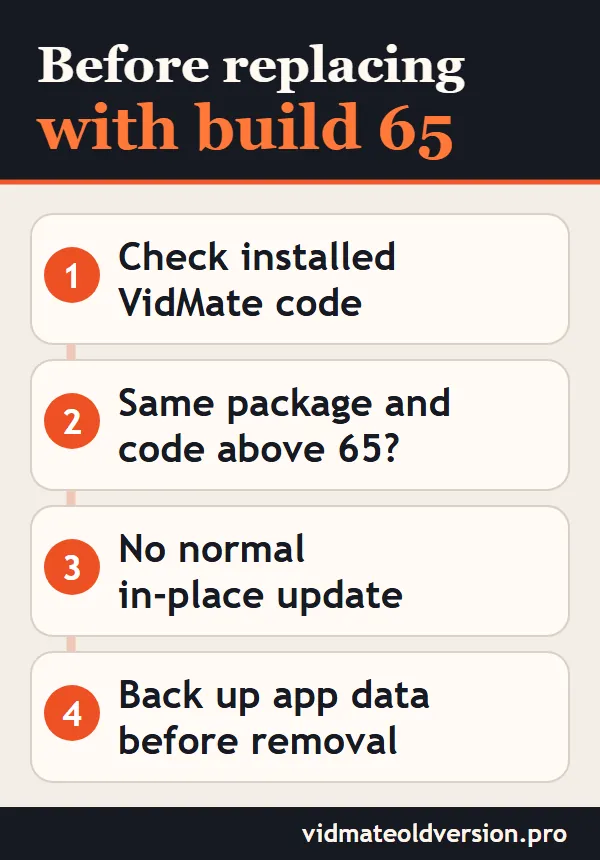
Before installing build 65, check which VidMate version is already on the device. If the installed application uses the same com.nemo.vidmate package but has a version code higher than 65, Android will normally treat build 65 as a downgrade rather than a normal update.
You may therefore need to remove the newer installation before installing the older APK. Uninstalling can also remove locally stored app data, so back up anything important before replacing the existing copy.
We have not installed build 65 on every Android device or confirmed that all of its historical online functions still operate today. The inspected file details cannot establish either outcome.