
VidMate Old Version 4.0401 APK Download: Check Build 40401
If you specifically need VidMate old version 4.0401, this page provides the archived APK for build 40401 together with the details needed to identify the exact file. The inspected APK uses the package name com.nemo.vidmate, declares Android 4.0 (API 14) as its minimum Android requirement, and contains an armeabi native-library folder.
This is an exact extended version number. VidMate 4.0401 should not be treated as simply any “VidMate 4.0” APK. If a backup, device setup or previous installation specifically names version 4.0401 or build 40401, check those full values before choosing the file.
Download VidMate 4.0401 APKVidMate old version 4.0401: build 40401 details
The inspected copy carries the following values inside the APK. They help separate build 40401 from a file that happens to have a similar name.
- Version
- 4.0401
- Build / version code
- 40401
- Package name
com.nemo.vidmate- Minimum Android
- Android 4.0 (API 14)
- File size
- 12.66 MiB (13,278,959 bytes)
- Native libraries
armeabi
The filename alone is weak evidence: it can change while the APK’s embedded version and code stay the same. Here, code 40401 narrows the choice to full version 4.0401 rather than an unspecified file from the wider 4.0 series.
Why 4.0401 should not be shortened to just 4.0
The full version recorded in this APK is 4.0401, with build code 40401. A download label saying only “VidMate 4.0” does not establish either of those values. If you need this exact APK, confirm 4.0401 or code 40401 rather than relying on the shortened label.
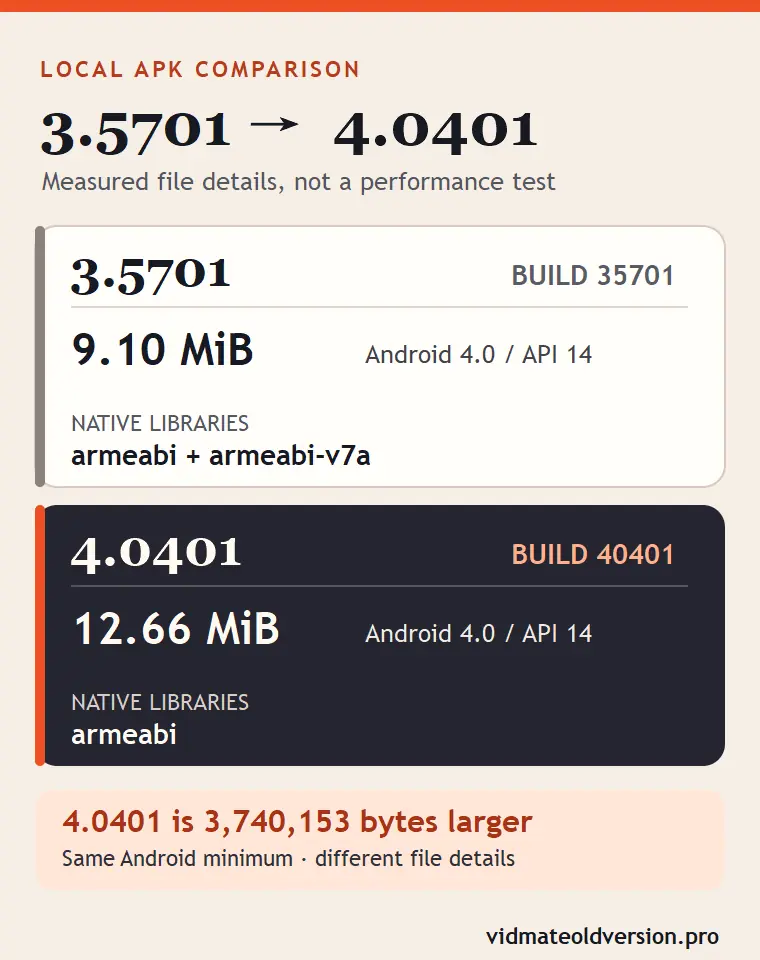
What differs between the inspected 3.5701 and 4.0401 APKs?
These are details measured from two local APKs. They show what changed in the file records, not which build will work better on a particular phone.
| Version | Build | APK size | Minimum Android | Native libraries |
|---|---|---|---|---|
| 3.5701 | 35701 | 9.10 MiB | Android 4.0 / API 14 | armeabi, armeabi-v7a |
| 4.0401 | 40401 | 12.66 MiB | Android 4.0 / API 14 | armeabi |
The 4.0401 APK is exactly 3,740,153 bytes larger than the inspected VidMate 3.5701 build 35701 file. Both still declare Android 4.0 (API 14) as their minimum. Their native-library folders also differ: 3.5701 includes armeabi and armeabi-v7a, while 4.0401 includes armeabi.
The file records do not explain why the size changed. They also cannot tell us whether the different library list affects speed or support for a particular device.
Android and ARM compatibility for build 40401
Below Android 4.0, a device does not meet the minimum declared by this APK. Android 4.0 or newer clears that one requirement, but it is not an installation or app-behavior test.
The armeabi folder identifies ARM-related native code packaged inside build 40401. It is not a complete list of compatible phones, nor does it establish that 4.0401 supports fewer devices than 3.5701.
How to identify the exact inspected 4.0401 APK
Version 4.0401, build 40401 and package com.nemo.vidmate identify the build. For the locally inspected copy, the recorded SHA-256 is:
b9b49b6055bdc474c160df6a69e5db79a2d05ee43e00d23f0fdb439710aac16f
If another APK produces the same hash, its bytes match that local copy. A hash match does not prove safety, device compatibility, working online services or successful installation. The hosted download has not been compared byte-for-byte with the inspected local file; compare its hash separately if exact file identity is important to you.
About the March 2019 archive date
A historical archive record lists 4.0401 on March 29, 2019. This is a listing date, not a confirmed official developer release date. The full version and code 40401 remain the more useful checks for identifying a saved APK.
When build 40401 is the version you need
Choose build 40401 when a trusted backup, setup record or earlier installation specifically calls for 4.0401. A broad “VidMate 4.0” label alone does not identify this file. Check the full version and your phone’s Android level before replacing an existing copy. If your record names VidMate 4.0811 build 40811 instead, check that separate APK’s full version.
Android may refuse an in-place downgrade to code 40401 when a newer com.nemo.vidmate build is installed. If you have to remove the installed copy, locally stored app data can be lost; back it up before proceeding.